mirror of
https://github.com/jkocon/g-helper.git
synced 2026-02-23 13:00:52 +01:00

158 lines
8.9 KiB
Markdown
158 lines
8.9 KiB
Markdown
# G-Helper - Lightweight control tool for Asus laptops
|
|
[](https://u24.gov.ua/)
|
|
[](https://GitHub.com/seerge/g-helper/releases/)
|
|
[](https://GitHub.com/seerge/g-helper/releases/) [](https://GitHub.com/seerge/g-helper/stargazers/)
|
|
|
|
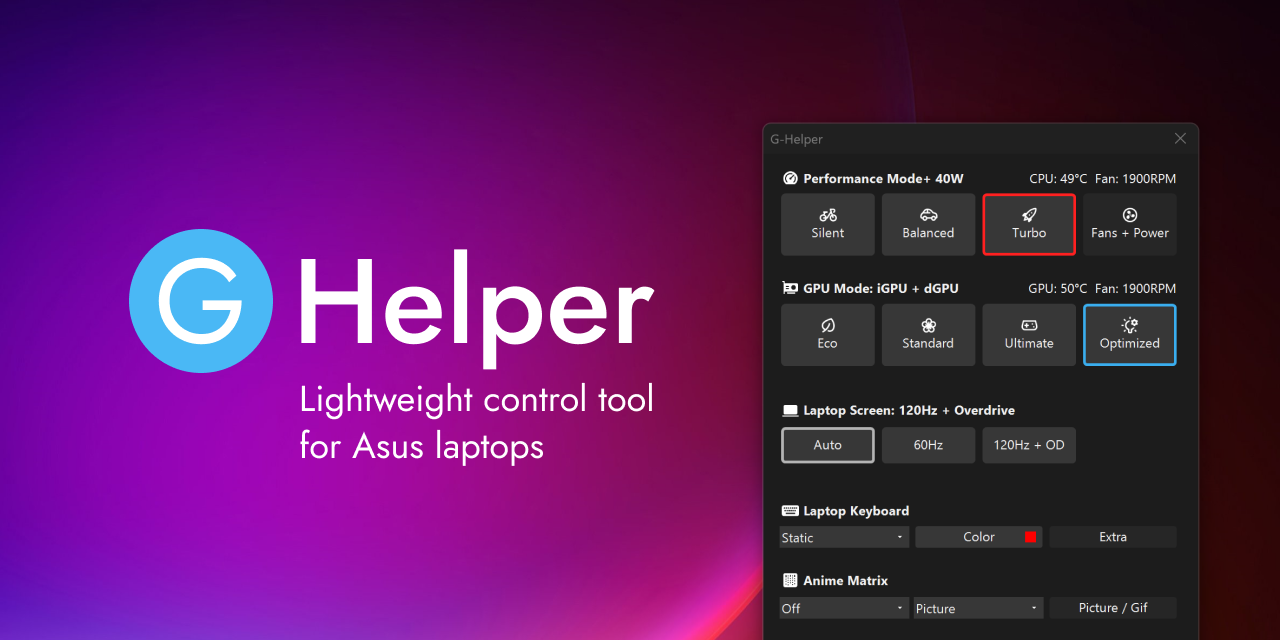
Small and lightweight Armoury Crate alternative for Asus laptops offering almost same functionality without extra bloat and unnecessary services.
|
|
Works with all popular models, such as ROG Zephyrus G14, G15, G16, M16, Flow X13, Flow X16, Flow Z13, TUF Series, Strix / Scar Series, ProArt, VivoBook and many more!
|
|
|
|
# [:floppy_disk:Download](https://github.com/seerge/g-helper/releases/latest/download/GHelper.zip)
|
|
|
|
- [FAQ](https://github.com/seerge/g-helper/wiki/FAQ)
|
|
- [Setup and Requirements](https://github.com/seerge/g-helper/wiki/Requirements)
|
|
- [Troubleshooting](https://github.com/seerge/g-helper/wiki/Troubleshooting)
|
|
- [Power User Settings](https://github.com/seerge/g-helper/wiki/Power-user-settings)
|
|
|
|
### Support project in [:euro: EUR](https://www.paypal.com/donate/?hosted_button_id=4HMSHS4EBQWTA) or [💵 USD](https://www.paypal.com/donate/?hosted_button_id=SRM6QUX6ACXDY)
|
|
|
|
[](https://github.com/seerge/g-helper/releases/latest/download/GHelper.zip)
|
|
|
|
## :loudspeaker: YouTube Reviews and Guides
|
|
| [](https://www.youtube.com/watch?v=hqe-PjuE-K8) | [](https://www.youtube.com/watch?v=6aVdwJKZSSc) |
|
|
| ----------------- | ---------------- |
|
|
| [Josh Cravey](https://www.youtube.com/watch?v=hqe-PjuE-K8) | [cbutters Tech](https://www.youtube.com/watch?v=6aVdwJKZSSc) |
|
|
|
|
## :gift: Advantages
|
|
|
|
1. Seamless and automatic GPU switching
|
|
2. All performance modes can be fully customized with power limits and fan curves
|
|
3. Lightweight. Doesn't install anything in your system. Just a single exe to run
|
|
4. Simple and clean native UI with easy access to all settings
|
|
5. FN-Lock and custom hotkeys
|
|
|
|

|
|
|
|
### :zap: Features
|
|
|
|
1. Performance modes: Silent - Balanced - Turbo (built-in, with default fan curves)
|
|
2. GPU modes: Eco - Standard - Ultimate - Optimized
|
|
3. Screen refresh rate control with display overdrive (OD)
|
|
4. Custom fan curve editor, power limits and turbo boost selection for every performance mode
|
|
5. Anime matrix control including animated GIFs, clock and Audio visualizer
|
|
6. Backlight animation modes and colors
|
|
7. Custom hotkeys (M-keys, FN+X keys)
|
|
8. Monitor CPU / GPU temperature, fan speeds and battery status
|
|
9. Battery charge limit to preserve battery health
|
|
10. NVidia GPU overclocking
|
|
11. XG Mobile Control
|
|
12. AMD CPU Undervolting
|
|
13. BIOS and Driver Updates
|
|
14. Asus Mice settings
|
|
15. Mini-led multi-zone switch
|
|
|
|
### :gear: Automation
|
|
- Performance Mode switching when on battery or plugged in
|
|
- Optimized GPU mode - disables dGPU on battery and enables when plugged in
|
|
- Auto Screen refresh rate (60Hz on battery and max Hz when plugged)
|
|
- Keyboard backlight timeout on battery or when plugged in
|
|
|
|
_To keep auto switching and hotkeys working the app needs to stay running in the tray. It doesn't consume any resources._
|
|
|
|
### :rocket: Performance Modes
|
|
|
|
<img align="right" width="300" src="https://github.com/seerge/g-helper/assets/5920850/3e119674-db8d-486b-aa65-2bf9b61f9aa6">
|
|
|
|
All Modes are **baked in BIOS** along with default fan curves and power limits and they are the **same** as in the Armoury Crate.
|
|
|
|
Each BIOS mode is paired with matching Windows Power Mode. You can adjust this setting under ``Fans + Power``
|
|
|
|
1. **Silent** in BIOS + **Best power efficiency** power mode
|
|
2. **Balanced** (Performance in AC) in BIOS + **Balanced** power mode
|
|
3. **Turbo** in BIOS + **Best performance** power mode
|
|
|
|
|
|
### :video_game: GPU Modes
|
|
|
|
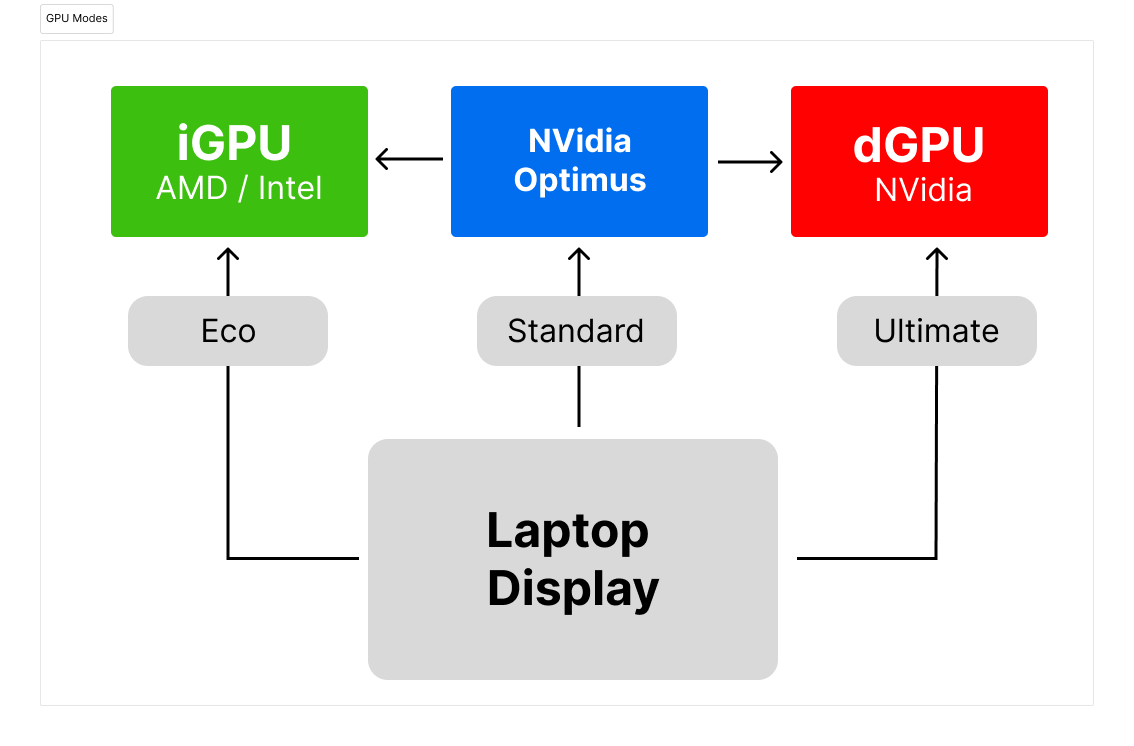
1. **Eco** : only low power integrated GPU enabled, iGPU drives built in display
|
|
2. **Standard** (MS Hybrid) : iGPU and dGPU enabled, iGPU drives built in display
|
|
3. **Ultimate**: iGPU and dGPU enabled, but dGPU drives built in display (supported on 2022+ models)
|
|
4. **Optimized**: disables dGPU on battery (Eco) and enables when plugged in (Standard)
|
|
|
|

|
|
|
|
|
|
|
|
|
|
### :mouse: Asus Mouse and other peripherals support
|
|
|
|
[Currently supported models](https://github.com/seerge/g-helper/discussions/900)
|
|
- ROG Chakram X (P708)
|
|
- ROG Chakram Core (P511)
|
|
- ROG Gladius II and Gladius II Origin (P502 and P504)
|
|
- ROG Gladius III
|
|
- ROG Gladius III Wireless
|
|
- ROG Harpe Ace Aim Lab Edition
|
|
- ROG Keris Wireless
|
|
- ROG Strix Carry (P508)
|
|
- ROG Strix III Gladius III Aimpoint Wireless (P711)
|
|
- ROG Strix Impact III (P518)
|
|
- ROG Spatha
|
|
- ROG Strix Impact II Wireless
|
|
- TUF Gaming M4 Wireless (P306)
|
|
- TUF Gaming M3
|
|
- TUF Gaming M3 Gen II
|
|
|
|
Huge thanks to [@IceStormNG](https://github.com/IceStormNG) 👑 for contribution and research (!).
|
|
|
|
### ⌨️ Keybindings
|
|
|
|
- ``Fn + F5 / Fn + Shift + F5`` - Toggle Performance Modes forwards / backwards
|
|
- ``Shift + Fn + F7 / F8`` - Set Anime Matrix / Slash Lightning brightness Down / Up
|
|
- ``Ctrl + Shift + F5 / Ctrl + Shift + Alt + F5`` - Toggle Performance Modes forwards / backwards
|
|
- ``Ctrl + Shift + F12`` - Open G-Helper window
|
|
- ``Ctrl + M1 / M2`` - Screen brightness Down / Up
|
|
- ``Shift + M1 / M2`` - Backlight brightness Down / Up
|
|
- ``Fn + C`` - Fn-Lock
|
|
- ``Fn + Shift + F7 / F8`` - Matrix brightness Down / Up
|
|
- ``Fn + Shift + F7 / F8`` - Screenpad brightness Down / Up
|
|
- ``Ctrl + Shift + F20`` - Mute Microphone
|
|
- ``Ctrl + Shift + Alt + F14`` - Eco GPU Mode
|
|
- ``Ctrl + Shift + Alt + F15`` - Standard GPU Mode
|
|
- ``Ctrl + Shift + Alt + F16`` - Silent
|
|
- ``Ctrl + Shift + Alt + F17`` - Balanced
|
|
- ``Ctrl + Shift + Alt + F18`` - Turbo
|
|
- ``Ctrl + Shift + Alt + F19`` - Custom 1 (if exists)
|
|
- ``Ctrl + Shift + Alt + F20`` - Custom 2 (if exists)
|
|
- [Custom keybindings / hotkeys](https://github.com/seerge/g-helper/wiki/Power-user-settings#custom-hotkey-actions)
|
|
|
|
------------------
|
|
#### If you like the app you can make a Donation
|
|
|
|
| [Paypal in EUR](https://www.paypal.com/donate/?hosted_button_id=4HMSHS4EBQWTA) | [Paypal in USD](https://www.paypal.com/donate/?hosted_button_id=SRM6QUX6ACXDY) |
|
|
| ------------------------------------------ | ----------------------------------------------- |
|
|
| [](https://www.paypal.com/donate/?hosted_button_id=4HMSHS4EBQWTA) | [](https://www.paypal.com/donate/?hosted_button_id=SRM6QUX6ACXDY) |
|
|
|
|
------------------
|
|
|
|
### 🔖 Important Notice
|
|
|
|
G-Helper is **NOT** an operating system, firmware, or driver. It **DOES NOT** "run" your hardware in real-time anyhow.
|
|
|
|
It's an app that lets you select one of the predefined operating modes created by manufacturer (and stored in BIOS) and optionally(!) set some settings that already exist on your device same as Armoury Crate can. It does it by using the Asus System Control Interface "driver" that Armoury uses for it.
|
|
|
|
If you use equivalent mode/settings as in Armoury Crate - the performance or the behavior of your device won't be different.
|
|
|
|
The role of G-Helper for your laptop is similar to the role of a remote control for your TV.
|
|
|
|
### Libraries and projects used
|
|
- [Linux Kernel](https://github.com/torvalds/linux/blob/master/drivers/platform/x86/asus-wmi.c) for some basic endpoints in ASUS ACPI/WMI interface
|
|
- [NvAPIWrapper](https://github.com/falahati/NvAPIWrapper) for accessing Nvidia API
|
|
- [Starlight](https://github.com/vddCore/Starlight) for anime matrix communication protocol
|
|
- [UXTU](https://github.com/JamesCJ60/Universal-x86-Tuning-Utility) for undervolting using Ryzen System Management Unit
|
|
- [AsusCtl](https://gitlab.com/asus-linux/asusctl) for inspiration and some reverse engineering
|
|
|
|
### Disclaimers
|
|
"ROG", "TUF", and "Armoury Crate" are trademarked by and belong to AsusTek Computer, Inc. I make no claims to these or any assets belonging to AsusTek Computer and use them purely for informational purposes only.
|
|
|
|
THE SOFTWARE IS PROVIDED “AS IS” AND WITHOUT WARRANTY OF ANY KIND, EXPRESS OR IMPLIED, INCLUDING BUT NOT LIMITED TO THE WARRANTIES OF MERCHANTABILITY, FITNESS FOR A PARTICULAR PURPOSE AND NONINFRINGEMENT. MISUSE OF THIS SOFTWARE COULD CAUSE SYSTEM INSTABILITY OR MALFUNCTION.
|